Best Mobile Camera Tested – Android vs iPhone Guide
Published: 21 Jun 2025
Tired of buying phones with “great cameras” that disappoint later? You’re not alone. Choosing the right phone for clear, bright photos is tough. That’s why we’ve tested the Android Vs iPhone Camera in real conditions. We’ll help you stop wasting money and pick the one that truly works for your needs.
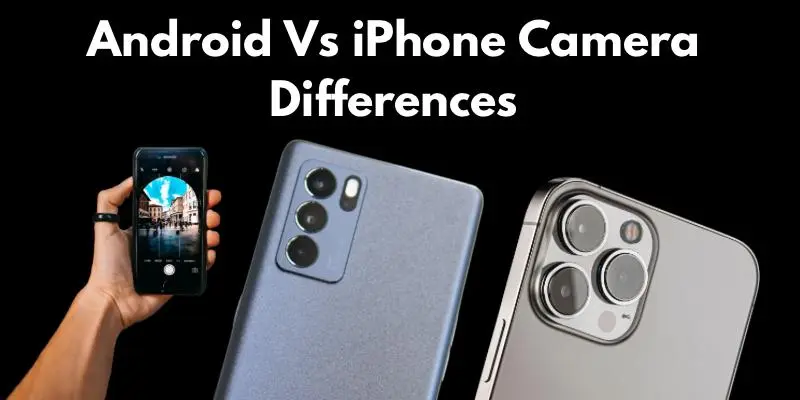
iPhone Camera – Strengths, Features, and Real Use
Let’s explore how Apple’s iPhone camera performs in real life and what makes it special.
iPhone Camera Hardware Breakdown
Apple doesn’t brag about camera specs. But their hardware works very well. You get strong sensors, sharp lenses, and smooth image processing. Each iPhone model is made to give better photo results. The camera and chip work together for fast and clear shots. You don’t need to tweak anything.
Apple also includes smart features like optical image stabilization. This keeps your photos steady even if your hands shake. It’s helpful for both kids and adults.
iPhone Photo Quality in Day and Night
In daylight, iPhones take bright and colorful photos. Faces look natural. Even in sunlight, the details stay clear. At night, iPhones use Night Mode to brighten the scene. The results are sharp and balanced. You won’t get too much noise or blur.
Do you like taking pictures at parties or low-light events? iPhone handles shadows and lights well. You just point and shoot.
iPhone Video Recording – Smooth and Sharp?
iPhones are known for top video quality. They support 4K at different frame rates. The result? Smooth, clear, and steady clips. Apple’s video stabilization is a big plus. Your hand can move, but the video still looks calm. Great for vlogs or family moments.
Even the sound recording is clean. You don’t need an extra mic for daily videos. Just hit record and go.
iPhone Camera App and Features
The iPhone camera app is simple. You don’t need to dig into menus. Everything is right on the screen. It includes useful modes like portrait, panorama, and slo-mo. You can switch modes fast. It’s great for beginners.
Live Photos and built-in filters make pictures more fun. You can add effects right away without extra apps. Isn’t that easy?
What iPhone Does Better in Photography
iPhone shines in ease of use. You don’t need pro skills to take great pictures. That’s a big win for many users. Colors look real. Focus is quick. Photos are almost always sharp and clean.
If you want a phone that “just works” for photos and videos, iPhone does that well. It’s great for daily use and social media, too.
Android Camera – Variety, Power, and Flexibility
Android phones come from many brands, each with different camera styles. Let’s explore their power.
Android Camera Hardware and Sensor Variety
Android phones come from many brands. That means a big mix of camera hardware. Some have large sensors. Others have extra lenses. You’ll see wide, ultra-wide, and even Periscope Zoom Lenses. This gives more options for different shots. Some phones even have 100x zoom.
Because of this variety, some Android phones beat iPhones in hardware. But some budget models may fall behind too.
Android Photo Quality in Different Conditions
Android cameras do well in good light. The photos are clear, bright, and full of detail. Colors may look a little more vibrant. At night, some Android phones use advanced night modes. You can get sharp and colorful photos even in low light. But it depends on the phone model.
Some Android phones even let you control brightness, focus, and shadows before taking a photo. That’s great if you like full control.
Android Video Features and Recording Quality
High-end Android phones also support 4K and 8K video. That means super sharp videos. Some even record at 60fps with full detail. You also get strong video stabilization in many phones. Even if you move, the video stays smooth. This helps in action shots or while walking.
If you care about sound, some Android phones have wind noise reduction. That makes your voice clearer in outdoor clips.
Android Camera Software and Pro Controls
Many Android phones come with rich camera apps. You can switch between different modes easily. Night, portrait, slow motion – all in one tap. You also get manual or “Pro” mode in many Android phones. You can set ISO, white balance, and shutter speed by yourself. That’s useful for learners and creators.
Some brands even use AI to adjust settings for each scene. The phone knows what you’re shooting and makes it better.
What Android Does Better in Photography
Android gives you more freedom. You can choose phones based on your camera needs. Want Zoom, or night shots, or pro control? You’ll find a model for it. You also get more editing tools in many phones. Some even let you edit RAW photos right inside the gallery.
If you like to try new styles, Android is for you. It’s made for users who want more options and control.
Conclusion
The battle of Android Vs iPhone Camera has no single winner. It depends on what you want. We gave you the facts to help you decide smartly. I recommend thinking about how you use your phone daily — that’s the best guide.
Browse more of our easy tips and mobile blogs to stay ahead. Knowledge is your tool — explore more and shoot like a pro
FAQs
It depends on your needs. iPhones offer cleaner photos with less effort. Android phones offer more control and features.
Yes, many Android phones have advanced zoom features like periscope lenses. They’re great for far-away shots.
Yes, many Android phones have Night Mode. Some models even perform better than iPhones in low light.
Both are good, but iPhones give you cleaner, more natural results ready to share. Android lets you edit more before posting.



- Be Respectful
- Stay Relevant
- Stay Positive
- True Feedback
- Encourage Discussion
- Avoid Spamming
- No Fake News
- Don't Copy-Paste
- No Personal Attacks
- Be Respectful
- Stay Relevant
- Stay Positive
- True Feedback
- Encourage Discussion
- Avoid Spamming
- No Fake News
- Don't Copy-Paste
- No Personal Attacks
